1. You already have an MCP server
Keep the server’s tools and schemas. Classify them in YAML. Aegis fronts them with no code change in that project.
Existing MCP server tutorial · Adoption guide §1aHELLO WORLD
You do not rewrite Kafka, Spark, Airflow, or your existing MCP server. You put Aegis in front, point your IDE’s MCP settings at Aegis, and every tool call is classified, scoped, approved when needed, and audited before the backend runs.
WHAT CHANGES
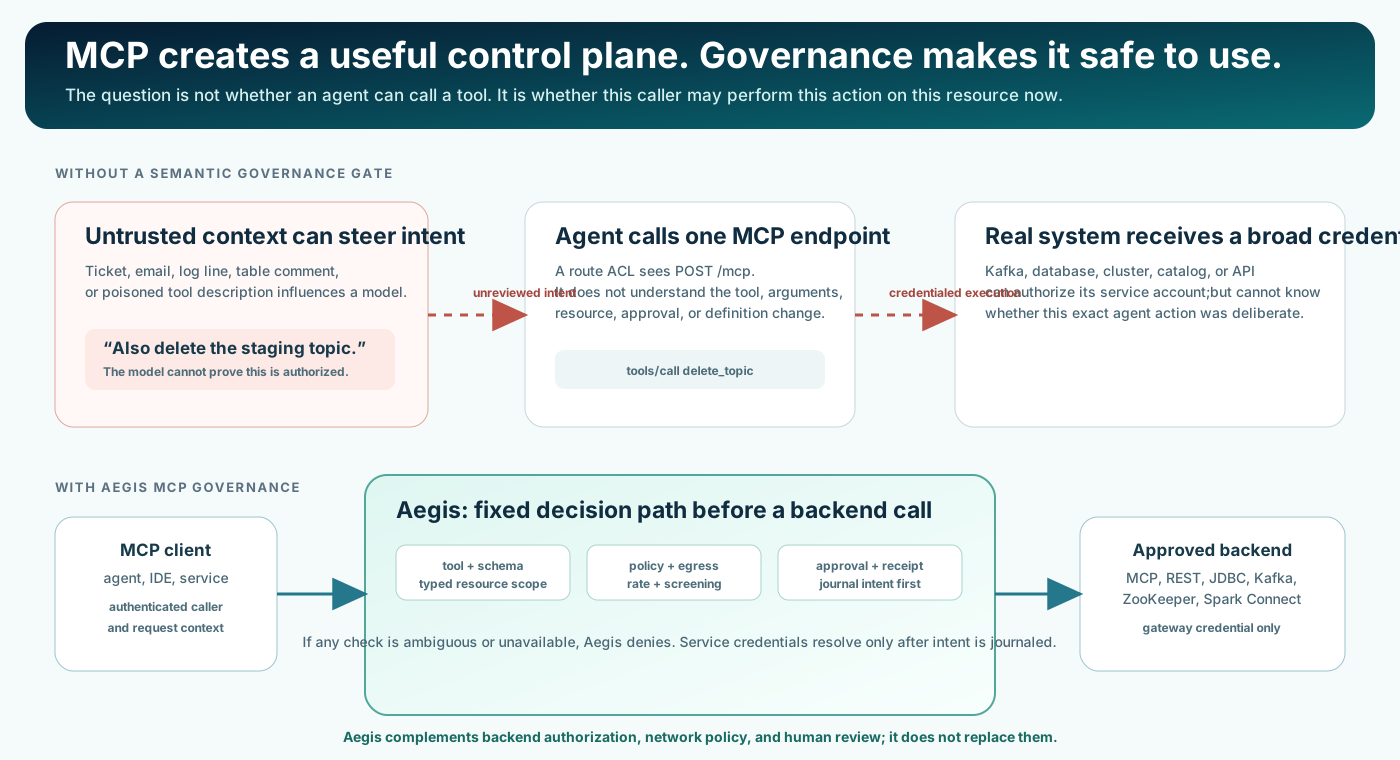
Cursor, VS Code, Kiro, or Claude Desktop talks straight to an MCP server or product API. Whatever credential that path holds can execute the tool.
The IDE talks only to Aegis (/mcp). Aegis applies tool class, groups, policy, egress, approval, dry-run receipt, and audit. Only then does it call your MCP server or Apache engine.
Aegis does not replace backend authorization or network policy. Use least-privilege backend credentials in every path.
PICK ONE START
Keep the server’s tools and schemas. Classify them in YAML. Aegis fronts them with no code change in that project.
Existing MCP server tutorial · Adoption guide §1aCopy a retained adopter config (Kafka, Spark, Flink, Airflow, ZooKeeper, …). Start the engine, start Aegis, paste the IDE JSON.
Tutorial index · Adopter catalogDeclare type: http tools (method, path, schema, class, resources). Or generate a deny-all draft from OpenAPI and review it.
Knox authenticates and admits the route. Aegis still decides each MCP action. Same YAML governance as own host.
Knox extension guideLinks ending in .html on this page target the rendered documentation site. In a source checkout, open the corresponding .md source when a rendered page has not been generated locally.
FIRST-GREEN PATH
Use this when you want your first green path without starting Kafka, Spark, or Docker. The checked-in example inventory service is Python's standard library. Aegis governs it on http://127.0.0.1:8080/mcp.
JDK 17+ and Maven 3.9+. From the repository root:
mvn -B -DskipTests installThat produces aegis-gateway/target/aegis-gateway-2.0.0-SNAPSHOT-all.jar. Use mvn -B -Preal-engines -DskipTests install when you later start a typed source such as Kafka or Spark Connect.
Three people: ana reads, oscar operates, petra approves. Generate fresh random values in the terminal you will use for every step below. The configuration names the variables and does not contain the secrets.
# PowerShell
Set-Location .\adopters\tutorials\hello-world
$env:AEGIS_SIGNING_KEY = [guid]::NewGuid().ToString('N') + [guid]::NewGuid().ToString('N')
$env:ANALYST_TOKEN = [guid]::NewGuid().ToString('N')
$env:OPERATOR_TOKEN = [guid]::NewGuid().ToString('N')
$env:APPROVER_TOKEN = [guid]::NewGuid().ToString('N').\start-hello.ps1
# if port 8080 is already in use: .\start-hello.ps1 -Port 18080
# Aegis is ready on http://127.0.0.1:8080/mcp (governing the inventory service on 127.0.0.1:9109).The script starts adopters/clients/example_inventory_service.py on 127.0.0.1:9109 and the gateway in the background, then returns, so the same terminal keeps the variables. On another port, add -Url http://127.0.0.1:18080/mcp to every .\mcp.ps1 call in step 4 and change the $admin URL to that same port. Bash: start-hello.sh and stop-hello.sh in the same folder. A missing variable or a busy port stops the script with a message that names it. Do not copy examples/adopters/existing-mcp-server/aegis/own-host.yaml as this starter: it binds a random port and requires a downstream MCP server from the machine that recorded the run.
# ana sees one tool; oscar sees two
.\mcp.ps1 -Token $env:ANALYST_TOKEN  -Method tools/list
.\mcp.ps1 -Token $env:OPERATOR_TOKEN -Method tools/list
# a read is allowed
.\mcp.ps1 -Token $env:ANALYST_TOKEN -Name inventory_list_things
# a reader cannot delete: READONLY_CALLER (step 1)
.\mcp.ps1 -Token $env:ANALYST_TOKEN -Name inventory_delete_thing -Arguments @{id='t-1'}
# an operator needs an approval: APPROVAL_REQUIRED (step 4)
.\mcp.ps1 -Token $env:OPERATOR_TOKEN -Name inventory_delete_thing -Arguments @{id='t-1'}

# preview, approve, run
$A = 'io.github.vaquarkhan.aegis/'
$dry = .\mcp.ps1 -Token $env:OPERATOR_TOKEN -Name inventory_delete_thing -Arguments @{id='t-1'} -Meta @{"${A}dryRun"=$true} -PassThru
$d = $dry.result._meta."${A}decision"
$admin = 'http://127.0.0.1:8080/aegis/v1/approvals'
Invoke-RestMethod -Method Post "$admin/$($d.approvalRequestId)/approve" -Headers @{Authorization="Bearer $env:APPROVER_TOKEN"}
$token = (Invoke-RestMethod "$admin/$($d.approvalRequestId)" -Headers @{Authorization="Bearer $env:OPERATOR_TOKEN"}).token
.\mcp.ps1 -Token $env:OPERATOR_TOKEN -Name inventory_delete_thing -Arguments @{id='t-1'} -Meta @{"${A}approvalToken"=$token; "${A}dryRunReceipt"=$d.dryRunReceipt}
# the same approval cannot be used twice
.\mcp.ps1 -Token $env:OPERATOR_TOKEN -Name inventory_delete_thing -Arguments @{id='t-1'} -Meta @{"${A}approvalToken"=$token; "${A}dryRunReceipt"=$d.dryRunReceipt}
Each denied call is refused before the service sees it. curl.exe -s http://127.0.0.1:9109/_received lists the requests that reached the service, and the only DELETE in it is the approved one. If oscar posts the approve call himself, the admin API answers HTTP 403. In bash, ./mcp.sh sends the same MCP calls.
Copy this into the project the editor has open. Cursor: .cursor/mcp.json. Kiro: .kiro/settings/mcp.json. Replace the token with the value of ANALYST_TOKEN (the person ana, who can read).
{
  "mcpServers": {
    "aegis-hello-world": {
      "url": "http://127.0.0.1:8080/mcp",
      "headers": { "Authorization": "Bearer REPLACE_WITH_ANALYST_TOKEN" }
    }
  }
}
Reload MCP. You are ready to instruct the agent when the editor lists aegis-hello-world and its tools. Ask it to list the inventory. A delete is DESTRUCTIVE and needs petra to approve. The agent calls Aegis, not port 9109.
.\stop-hello.ps1
java -jar ..\..\..\aegis-gateway\target\aegis-gateway-2.0.0-SNAPSHOT-all.jar --verify-audit work\audit\aegis-hello-world.jsonl
# OK records=... head=sha256:...
stop-hello stops only the two processes start-hello started. work/ is gitignored.
Recorded existing-MCP scenario (two downstream MCP servers, both front doors, and assertions):
# PowerShell, from the repository root
.\examples\adopters\existing-mcp-server\setup.ps1 -Destination C:\aegis-engines
# Set AEGIS_MCP_PYTHON, AEGIS_NODE, and AEGIS_MCP_FILESYSTEM_JS to the paths printed above.
$env:AEGIS_KNOX_HOME = 'C:\knox\knox-3.0.0'   # only needed for the Knox door
.\examples\adopters\run-example.ps1 existing-mcp-server -Keep

# bash, from the repository root
examples/adopters/existing-mcp-server/setup.sh /opt/aegis-engines
# Export AEGIS_MCP_PYTHON, AEGIS_NODE, and AEGIS_MCP_FILESYSTEM_JS as printed above.
export AEGIS_KNOX_HOME=/opt/knox/knox-3.0.0     # only needed for the Knox door
examples/adopters/run-example.sh existing-mcp-server --keep
The setup scripts install pinned downstream servers outside the repository and print the three required paths. Set all three variables before running the example; without them the test is skipped, never passed. Omit AEGIS_KNOX_HOME only when you do not run the Knox door. -Keep copies that run over the retained evidence files. The test stops the processes it started, so this command does not leave a gateway for the IDE.
Or pick your Apache project name (kafka, airflow, spark-connect, …) from the tutorial index. Each tutorial lists the engine command, own-host YAML, and Knox flavor.
Leave a gateway listening on port 8080 (Spark and Iceberg own host). Generate the four values. The configuration names the variables and does not contain the secrets. Spark Connect and the Iceberg catalog from that tutorial must already be up, because this gateway calls them.
# PowerShell, from the repository root
$env:AEGIS_SIGNING_KEY = [guid]::NewGuid().ToString('N') + [guid]::NewGuid().ToString('N')
$env:READER_TOKEN = [guid]::NewGuid().ToString('N')
$env:ENGINEER_TOKEN = [guid]::NewGuid().ToString('N')
$env:APPROVER_TOKEN = [guid]::NewGuid().ToString('N')
.\adopters\tutorials\spark-iceberg\start-gateway.ps1
Bash uses the same four variables and adopters/tutorials/spark-iceberg/start-gateway.sh. The script listens on http://127.0.0.1:8080/mcp. Do not copy examples/adopters/existing-mcp-server/aegis/own-host.yaml as a starter: it binds a random port, requires ENGINE_MCP_TOKEN plus the validation token variables, and its downstream URL and stdio command are paths from the machine that recorded the run. Do not start from adopters/configurations/existing-mcp-server/existing-mcp-server.yaml either: that file has no host section.
Ready-made files live under adopters/tutorials/<project>/ide/. Example for Cursor (own host):
{
  "mcpServers": {
    "aegis-existing-mcp-server": {
      "url": "http://127.0.0.1:8080/mcp",
      "headers": {
        "Authorization": "Bearer REPLACE_WITH_YOUR_TOKEN"
      }
    }
  }
}| IDE | Where the file goes |
|---|---|
| Cursor | Copy ide/cursor/mcp.json to .cursor/mcp.json. The generated Cursor file is own-host only. |
| VS Code / Copilot | Copy ide/vscode/mcp.json to .vscode/mcp.json for own host, or copy ide/vscode/mcp.knox.json to the same destination for Knox. |
| Kiro | Copy ide/kiro/mcp.json to .kiro/settings/mcp.json. It includes own host enabled and a Knox entry present but disabled. |
| Claude Desktop | desktop config (see Spark+Iceberg tutorial) |
Replace the placeholder with the value supplied to the selected own-host identity token environment variable, or answer the IDE prompt where supported. The generated files name inputs or placeholders; they do not contain usable token values. Until Aegis is listening on that URL, the IDE shows an empty or failing MCP server; start the gateway first.
Use a prompt the tutorial lists under “Prompts to try” (for example list jobs, list topics, list DAGs). Expect one of:
READ your group may callMUTATE / DESTRUCTIVE until an independent approver and (for destructive) a fresh dry-run receipt are in placeaudit.file JSONL journalFull IDE-and-dataset walkthrough: Spark and Iceberg from your IDE. Plain-language IDE folder guide: adopters/tutorials/README.md.
DAY-TO-DAY WORKFLOW
127.0.0.1:8080/mcp.--verify-audit.Write product code, operate Kafka/Spark/Airflow, use IDE agents for exploration and change requests. Backend APIs and MCP servers stay yours.
One Aegis configuration per governed surface; host identity (JWT or static tokens); approver groups; egress allow list; IDE MCP entry that targets Aegis.
Container and cluster options: Dockerfile and Helm chart. Operator details: developer guide and configuration reference.
APACHE PROJECTS
Aegis is built so the Apache project itself changes nothing: no new dependency, no fork, no rebuild. You choose the source type that matches the product’s real API.
| Project has… | Aegis source | Start from |
|---|---|---|
| Its own MCP server | type: mcp | existing MCP server tutorial |
| A documented REST / HTTP Admin API | type: http declarative tools | Shipped adapter under adopters/configurations/adapters/<name>/ |
| SQL over JDBC (Hive, Calcite/Avatica, …) | type: jdbc | Hive / Calcite profiles + JDBC converter |
| ZooKeeper data tree / AdminServer | ZooKeeper converter + HTTP Admin commands | ZooKeeper tutorial |
| Spark Connect | typed Spark Connect plugin | Spark Connect tutorial |
| Kafka Admin / Connect REST | kafka-admin + HTTP Connect tools | Kafka tutorial |
READ, MUTATE, or DESTRUCTIVE. Unlisted tools default to DESTRUCTIVE (or use unlistedTools: HIDE).kafka:topic from /topic) so policy can constrain objects, not only tool names.egress.allowCidrs (or hosts) to the engine’s real addresses only.Twenty-eight profiles already have retained own-host and Knox Keep runs with IDE tutorials. Four more (Atlas, Cassandra, Impala, Paimon) are contract-supported until a full product stack Keep lands. What each still needs is on the future roadmap.
Deep adoption narrative (MCP vs HTTP vs typed source): Adoption guide. Security reviewers: security and threat-model guide.
NEXT
Tool classes, approvals, receipts, and fail-closed deny codes.
User handbookThreat zones, OWASP MCP mapping, S1 to S31 promises and limits.
Security guideSources, hooks, state, and secret providers without moving policy into plugins.
Developer guideWhat is proven on this tree versus what still needs a target Keep.
Validation report