Deploy AIV into a repository
AIV is a local/CI executable, not a long-running server. Deployment means placing a compatible CLI jar in the workflow, committing explicit .aiv/ policy, and selecting the result surfaces required by the repository.
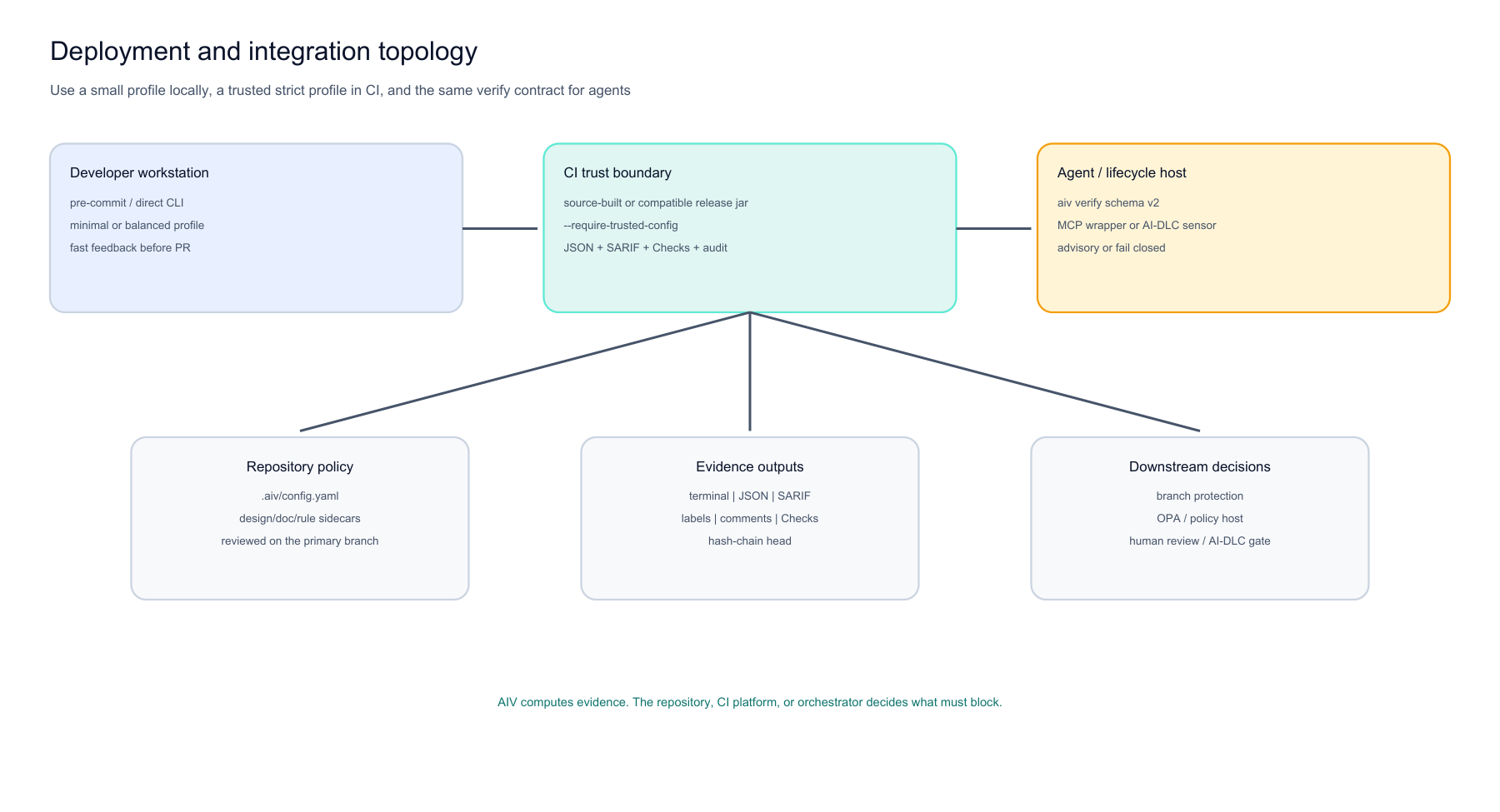
Figure 1: Three deployment surfaces share one engine. Developers run a small profile before commit. CI runs a strict policy-bound profile and publishes machine evidence. Agents and lifecycle tools call the schema-v2 verify contract.
1. Choose a distribution channel
Release 2.0.0
Tag v2.0.0 and the Action input aiv-version: 2.0.0 are this release. Prefer Maven Central once the coordinate is live; the GitHub release asset is the fallback. Verify the checksum before use:
curl -fsSL -o aiv-cli.jar \
  "https://repo1.maven.org/maven2/io/github/vaquarkhan/aiv-cli/2.0.0/aiv-cli-2.0.0.jar"
# Or: https://github.com/vaquarkhan/aiv-integrity-gate/releases/download/v2.0.0/aiv-cli-2.0.0.jar
sha256sum aiv-cli.jar
In the Action, set aiv-version: 2.0.0 and pin with cli-jar-sha256 when you download by URL.
Build tag v2.0.0
git clone https://github.com/vaquarkhan/aiv-integrity-gate.git
cd aiv-integrity-gate
git checkout v2.0.0
mvn clean verify
export AIV_JAR="$(pwd)/aiv-cli/target/aiv-cli-2.0.0.jar"
java -jar "$AIV_JAR" verify --capabilities
A compatible jar reports a successful capability handshake containing trusted-policy and policy-tree-digest.
For consumer CI, pass that jar through cli-jar-path or cli-jar-url, or set aiv-version: 2.0.0. Do not clone a mutable default branch in every consumer build.
2. Choose an explicit profile
java -jar "$AIV_JAR" init --preset minimal --workspace /path/to/project
java -jar "$AIV_JAR" init --preset java-ci --workspace /path/to/project
java -jar "$AIV_JAR" init --preset agent-paste-strict --workspace /path/to/project
All presets explicitly name all 16 gates. See MODULE-ADOPTION-GUIDE.md for gate/module prerequisites and profile matrices.
3. Commit policy
.aiv/
  config.yaml
  design-rules.yaml
  doc-rules.yaml
  baseline.txt
  rules/team.yaml
Keep policy inputs under .aiv/. Commit them to the primary branch and protect changes through review. AIV pins the base ref to one commit OID and materializes those Git blobs into an immutable snapshot for each run.
4. Local developer path
java -jar "$AIV_JAR" --workspace . --diff origin/main --head HEAD
For staged/pre-commit setup, see PRE-COMMIT.md. Local profiles should stay small enough to give useful feedback without depending on services that are unavailable on developer machines.
5. Strict CI command
java -jar "$AIV_JAR" \
  --workspace . \
  --diff origin/main \
  --head HEAD \
  --require-trusted-config \
  --output-json aiv-report.json \
  --output-sarif aiv-results.sarif \
  --audit-log .aiv/audit.log
Strict mode fails when base policy is unavailable, the live .aiv tree differs, ignored extras exist, a symlink/path escape is present, or a blocking gate fails.
6. Hardened composite Action
The current source Action intentionally has no unsafe default release version. Supply a compatible jar:
name: AIV
on: [pull_request]
permissions:
  contents: read
  checks: write
  pull-requests: write
jobs:
  aiv:
    runs-on: ubuntu-latest
    steps:
      - uses: actions/checkout@34e114876b0b11c390a56381ad16ebd13914f8d5
        with:
          fetch-depth: 0
      - uses: vaquarkhan/aiv-integrity-gate@v2.0.0
        with:
          base-ref: origin/$
          aiv-version: "2.0.0"
          publish-github-checks: "true"
          label-pr-on-advisory: "true"
Prefer a release tag or an immutable commit SHA for uses:. After publish, aiv-version: 2.0.0 pulls the Central jar.
The Action:
- sets up Java,
- resolves the jar from path/URL/version,
- requires a positive
verify --capabilitieshandshake, - runs with
--require-trusted-config, - writes JSON and SARIF,
- optionally publishes Checks/labels/comments.
7. GitHub permissions
Grant only what is used:
permissions:
  contents: read
  checks: write          # only for --publish-github-checks
  pull-requests: write   # only for labels/comments
Fork PR tokens may not have write permission. Explicit publication errors are reported; the gate result remains separate from publication.
8. Other CI systems
Any system that can run Java can execute AIV:
java -jar aiv-cli.jar --workspace . --diff "$BASE_REF" --head "$HEAD_REF" \
  --require-trusted-config --output-json aiv-report.json --output-sarif aiv-results.sarif
The requirements are:
- full Git history/base ref available,
- JDK 17+,
- compatible AIV jar,
.aiv/policy on the base branch,- optional external tool/registry/model prerequisites for enabled gates.
See CI-SNIPPETS.md.
9. Agent and MCP-style integration
java -jar aiv-cli.jar verify --request change.json --workspace . \
  --policy-ref origin/main --require-trusted-policy
Stdout is one JSON object; stderr contains diagnostics. See MCP.md.
10. AI-DLC integration
Use the complete plugin under integrations/aidlc/plugin/. Advisory file mode gives fast feedback; blocking full-request mode requires trusted policy and rejects undeclared external inputs. See AIDLC.md.
11. Evidence retention
--audit-log writes an OS-locked hash chain. Preserve the returned head outside the log for independent verification:
java -jar aiv-cli.jar audit verify .aiv/audit.log --expect-head <head>
java -jar aiv-cli.jar report --audit-log .aiv/audit.log --out aiv-evidence.html
Choose retention/access control based on the paths/messages/metadata your records contain.
12. Deployment checklist
- compatible jar passes
verify --capabilities - explicit profile lists all 16 gates
- policy sidecars live under
.aiv/ .aiv/is committed to the primary branch- CI fetches complete base history/ref
- strict CI uses
--require-trusted-config - external gate tools are pinned/installed
- registry/model dependencies are intentional
- JSON/SARIF artifacts are retained as needed
- GitHub permissions are least privilege
- audit head is externally anchored if tamper evidence is required
- project has documented suppression/override review
13. Verification
Run a clean change and one intentional failure. Confirm:
- expected exit code,
- finding rule/path/line,
- SARIF severity,
- policy commit/source in verify output,
- Action capability handshake,
- audit chain verification.
Full lab: HELLO-WORLD.md.
Author: Viquar Khan